> ## Documentation Index
> Fetch the complete documentation index at: https://support.artisan.co/llms.txt
> Use this file to discover all available pages before exploring further.
# Intro to website visitors
> See who's visiting your site and turn them into leads for Ava to reach out to.
Website visitors show you who is visiting your site and turn them into leads for Ava to reach out to. Visitors in the US can be identified as a specific person. Visitors anywhere else are identified by company.
Identifying visitors uses credits. You can set a monthly budget per domain and turn person or company identification on or off independently, so you stay in control of spend.
## The Website visitors page
When you open Website visitors for the first time, you won't see any data. To start, add the domain you want to track visitors on.
Once a domain is connected, the page shows who's visiting your site. Two tabs separate the data: the **People** tab shows individuals, and the **Companies** tab shows companies that visited your site. The **Traffic** panel at the top counts identified visitors for today, the past 7 days, and the past 30 days, with the change against the previous period.
Below that is the list of visitors. Each row shows the visitor's name and job title, their company, industry, and location, and when they were last seen. Where an email or phone number isn't filled in, use **Enrich** to find it. You can use the search bar to find a specific visitor.
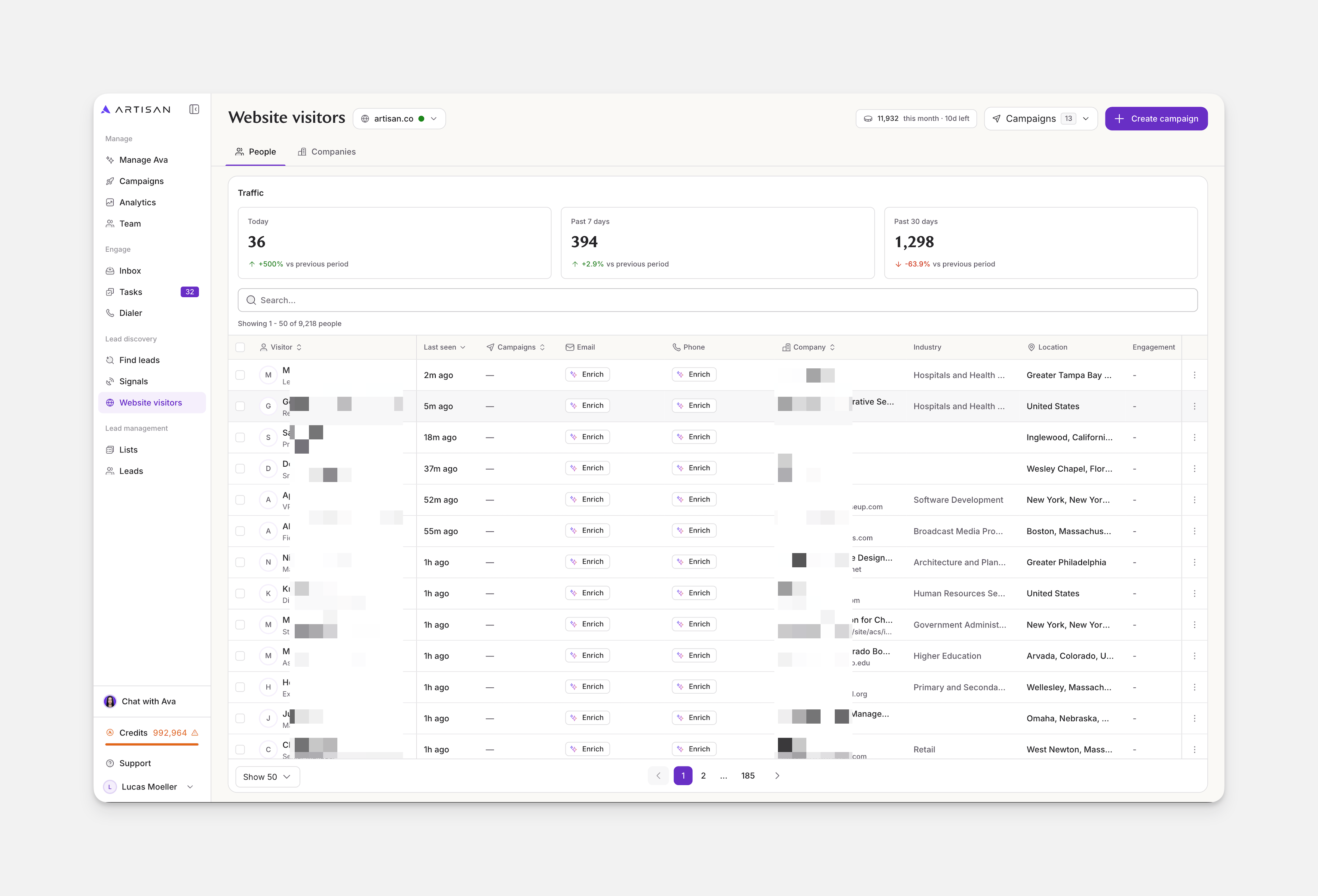 If you track more than one site, use the domain menu at the top of the page to switch between them.
## Add a domain
You need to add and verify a domain before Website visitors can identify anyone. On the empty page, click + Add domain.
If you track more than one site, use the domain menu at the top of the page to switch between them.
## Add a domain
You need to add and verify a domain before Website visitors can identify anyone. On the empty page, click + Add domain.
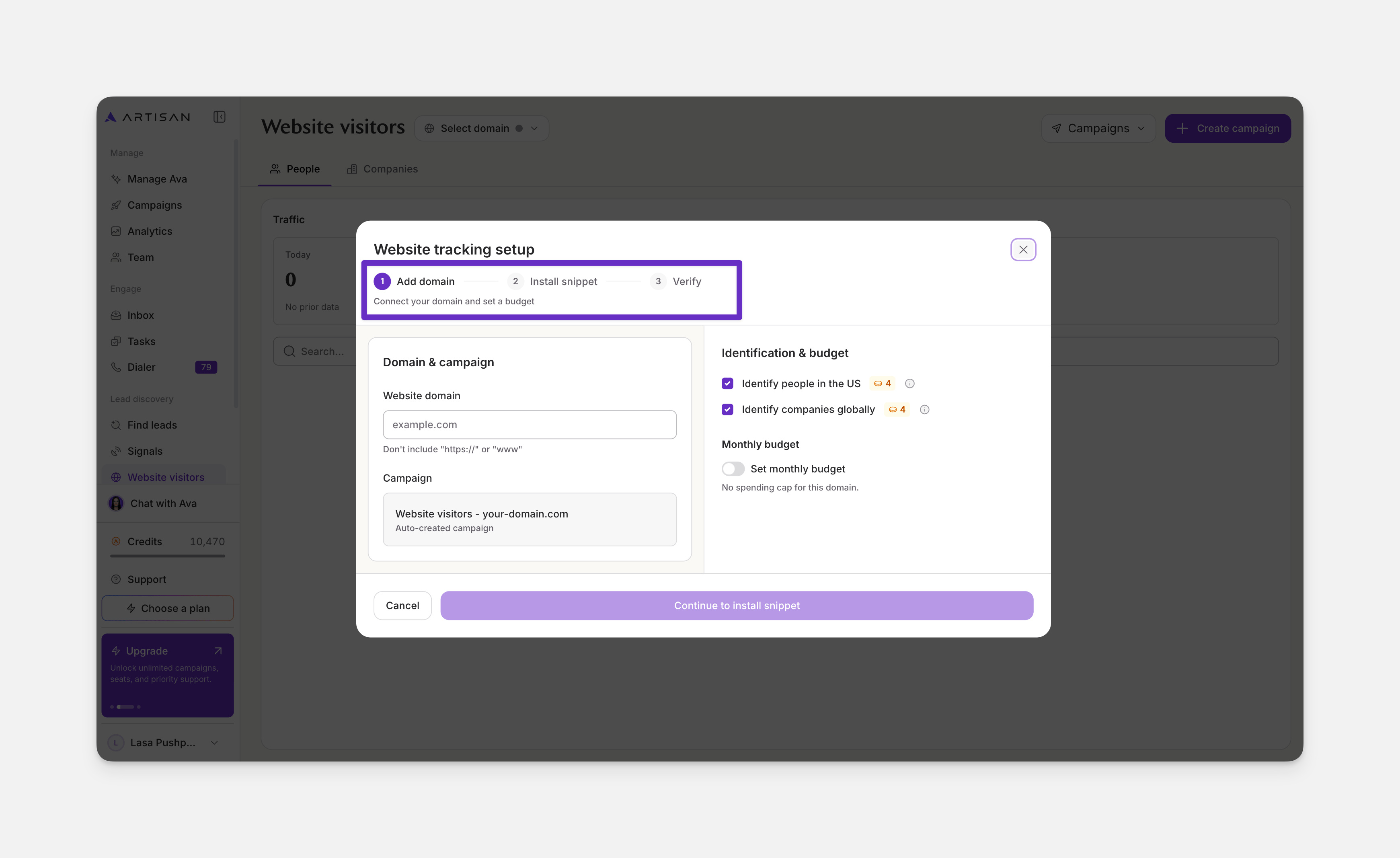
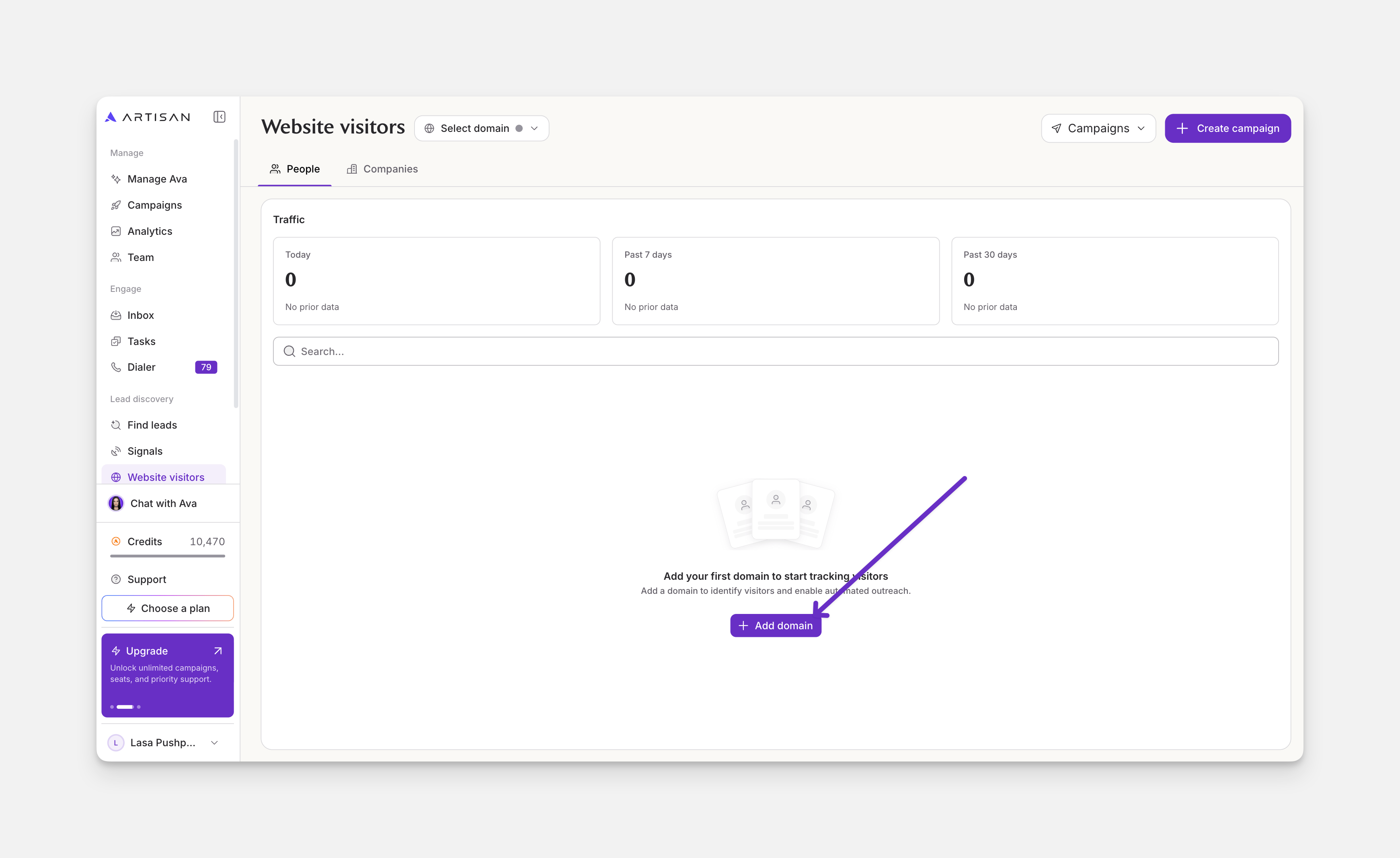 This opens the **Website tracking setup** flow:
1. **Add domain:** enter your domain, choose whether to identify people in the US and companies globally, and optionally set a monthly budget.
2. **Install snippet:** add the tracking snippet to your site.
3. **Verify:** confirm the installation.
4. **Set up campaign**: adding the domain creates a campaign for it automatically, but it doesn't run until you set it up. Once tracking is verified, click **Set up campaign**, or set it up later.
This opens the **Website tracking setup** flow:
1. **Add domain:** enter your domain, choose whether to identify people in the US and companies globally, and optionally set a monthly budget.
2. **Install snippet:** add the tracking snippet to your site.
3. **Verify:** confirm the installation.
4. **Set up campaign**: adding the domain creates a campaign for it automatically, but it doesn't run until you set it up. Once tracking is verified, click **Set up campaign**, or set it up later.
 You can always change the budget or identification settings by opening **Budget & billing** at the top of the **Website visitors** page.
## Set up outreach
Each domain may have multiple campaigns, but it won't send anything until you set one up. You can do that from **Set up campaign** at the end of domain setup, or later from the **Campaigns** tab, by choosing the **Website visitors** **campaign** from the list.
In the campaign's **Targeting** tab, you decide who counts as a lead: which identified visitors to include, the kind of people Ava should pursue, and whether Ava should research and qualify each one before reaching out.
You can set up the steps in [Sequence](https://support.artisan.co/create-a-sequence), configure your messaging in [Messaging](https://support.artisan.co/build-messaging-for-your-campaign), and adjust how the campaign runs in [Settings](https://support.artisan.co/configure-campaign-settings).
## Frequently asked questions
Visitors in the US can be identified down to a specific person, with their name, title, and company. Visitors from anywhere else are identified at the company level. You can turn person and company identification on or off separately for each domain.
Yes. Open the domain menu at the top of the Website visitors page and click **+ Add domain** to add another.
You can always change the budget or identification settings by opening **Budget & billing** at the top of the **Website visitors** page.
## Set up outreach
Each domain may have multiple campaigns, but it won't send anything until you set one up. You can do that from **Set up campaign** at the end of domain setup, or later from the **Campaigns** tab, by choosing the **Website visitors** **campaign** from the list.
In the campaign's **Targeting** tab, you decide who counts as a lead: which identified visitors to include, the kind of people Ava should pursue, and whether Ava should research and qualify each one before reaching out.
You can set up the steps in [Sequence](https://support.artisan.co/create-a-sequence), configure your messaging in [Messaging](https://support.artisan.co/build-messaging-for-your-campaign), and adjust how the campaign runs in [Settings](https://support.artisan.co/configure-campaign-settings).
## Frequently asked questions
Visitors in the US can be identified down to a specific person, with their name, title, and company. Visitors from anywhere else are identified at the company level. You can turn person and company identification on or off separately for each domain.
Yes. Open the domain menu at the top of the Website visitors page and click **+ Add domain** to add another.